vLLM OpenAI-Compatible Server
Trooper.AI provides a fully automated vLLM deployment template that installs, configures, and runs an OpenAI-compatible inference server on your GPU server using systemd.
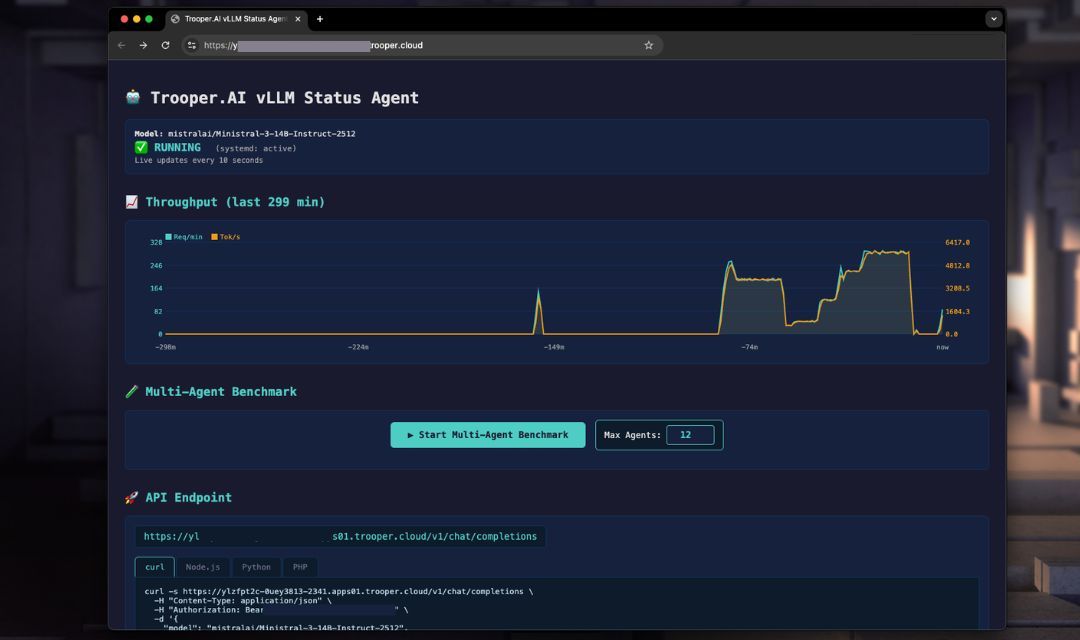
The goal:
- Maximum throughput
- Automatic GPU architecture tuning
- OpenAI-compatible API
- Production-safe defaults
- Zero manual GPU tuning required
The template automatically:
- Detects GPU architecture and VRAM
- Selects optimal precision (FP16 / BF16 / FP8)
- Tunes batching and concurrency
- Installs vLLM in a virtual environment
- Creates a persistent systemd service
- Exposes OpenAI-compatible endpoints
- Benchmark performance to tune parameters
You only control a small set of public parameters.
Understanding GPU Numbers: vLLM works with multiple GPUs, but it requires the number of GPUs to evenly divide the model’s attention heads. For instance, a model like Gemma with 32 attention heads can use 1, 2, 4, or 8 GPUs – but not 3.
Important Security Note on Screenshots: The servers shown in the screenshots are for demonstration purposes only and are secured by the Trooper.AI Network-Level Firewall, which is included with all GPU Server orders. For detailed information, see 🛡️ Native Firewall before your GPU Server.
Settings of vLLM template
This template deploys a ready-to-use vLLM inference server on your Trooper.AI instance. It installs the required runtime, configures the API endpoint, and prepares the model for OpenAI-compatible requests.
Below is a short explanation of each configuration option.
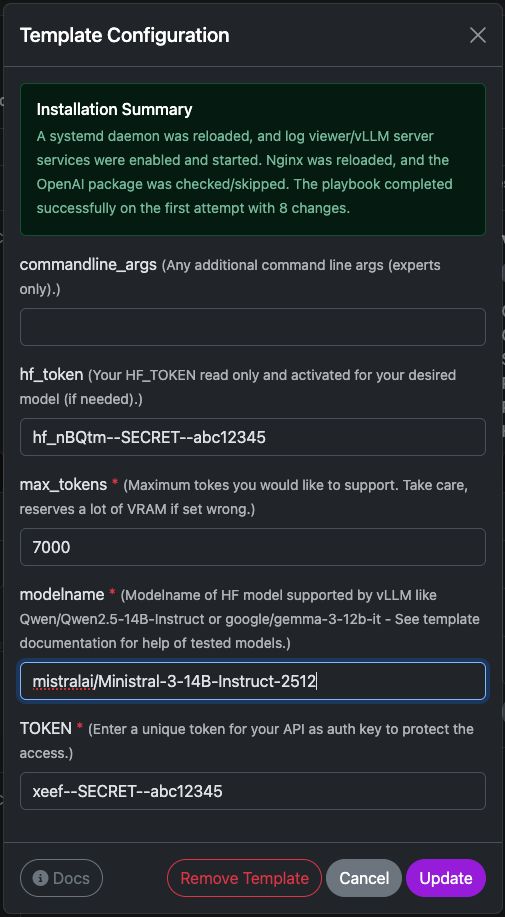
commandline_args
Optional advanced arguments passed directly to the vLLM server startup command.
Use this if you need to enable additional features such as:
- tensor parallelism
- quantization
- tool calling
- custom tokenizer settings
- speculative decoding
Example:
--tensor-parallel-size 2
Leave empty unless you know exactly which flags you want to use.
hf_token
Your HuggingFace access token.
This is required if the model:
- is gated
- requires authentication
- or is downloaded from a private repository
For public models this field can be left empty.
You can generate a token here:
https://huggingface.co/settings/tokens
The token is only used during model download.
max_tokens
Defines the maximum context window the server should support.
This directly affects VRAM usage.
Typical values:
| Context | Recommended |
|---|---|
| small models | 4096 |
| medium models | 8192 |
| long context models | 16384+ |
Higher values increase memory usage significantly. If your server runs out of VRAM, lower this value.
modelname
The HuggingFace model identifier that vLLM should load.
Example:
mistralai/Ministral-3-14B-Instruct-2512
Other compatible examples:
Qwen/Qwen2.5-14B-Instruct
google/gemma-3-12b-it
meta-llama/Meta-Llama-3-8B-Instruct
... and many more
Make sure the model is supported by vLLM and fits into your GPU memory.
TOKEN
This is your API authentication key.
All requests to the vLLM server must include this token in the header:
Authorization: Bearer YOUR_TOKEN
This protects your server from unauthorized access.
Example request:
curl https://your-server/v1/chat/completions \
  -H "Authorization: Bearer YOUR_TOKEN"
Use a strong random string.
Model Size & GPU Requirements
You can utilize a wide range of large language models from HuggingFace within vLLM. Ensure sufficient VRAM is available, as performance is contingent upon having adequate free GPU VRAM to accommodate the model and context size, multiplied by the number of concurrent users.
Trooper.AI automatically selects optimal precision per GPU architecture.
VRAM calculation: Model weights + ~25% KV-Cache buffer.
VRAM can be shared across multiple GPUs via Tensor Parallelism (--tensor-parallel-size N).
| Model | Parameters | Precision | Min. VRAM Total | GPU Configuration | GPUs |
|---|---|---|---|---|---|
| Qwen/Qwen3-4B | 4B | BF16 | ~8 GB | 1× V100 16GB / RTX 4070 Ti Super | 1 |
| Qwen/Qwen3-8B | 8B | BF16 | ~20 GB | 1× RTX 3090 / RTX 4090 (24 GB) | 1 |
| mistralai/Ministral-3-14B-Instruct-2512 | 14B | FP8 | ~29 GB | 1× RTX 4080 Pro 32GB or 1× A100 40GB | 1 |
| Qwen/Qwen3-32B | 32B | FP8 | ~40 GB | 1× A100 40GB or 2× RTX 4090 (2×24 GB) | 1–2 |
| meta-llama/Llama-3.1-8B-Instruct | 8B | FP8 | ~20 GB | 1× RTX 3090 / RTX 4090 (24 GB) | 1 |
| meta-llama/Llama-3.1-70B-Instruct | 70B | FP8 | ~90 GB | 1× RTX Pro 6000 Blackwell (96 GB) or 2× A100 (2×40 GB) | 1–2 |
Note: FP8 is used on Ada/Hopper architectures (RTX 40-series, A100, H100) for maximum throughput. \
Trooper.AI automatically selects the optimal precision for your GPU.
Multi-GPU setups use Tensor Parallelism — VRAM scales linearly across GPUs.
Public Parameters
These parameters can be set via environment variables before running the installer.
| Variable | Description |
|---|---|
TOKEN |
API key for authentication |
modelname |
HuggingFace model path |
hf_token |
HuggingFace token (for gated models) |
commandline_args |
Optional extra vLLM CLI arguments |
Automatic Benchmarking to tune Parameters
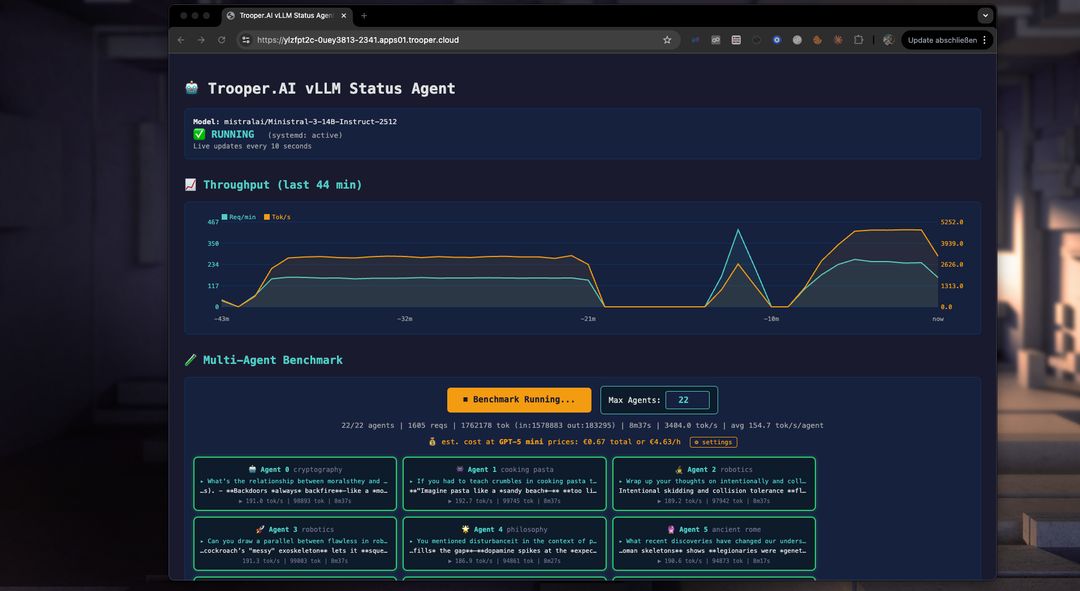
Our template includes a performance benchmark to help you optimize your GPU server for multi-agent use. Use it to test and compare models, GPU types, and parameters to maximize throughput and concurrent users.
How does the benchmark work?
The benchmark starts multiple agents simultaneously, each interacting with the vLLM server endpoint on a different topic. This prevents caching and tests real-world performance. You can see the throughput of each agent, the total throughput, and compare costs for tokenized services like GPT-5 mini. Often, a vLLM server from Trooper.AI is 2-4x cheaper than large token-based inference services while keeping your LLM work private!
What the Template Does
-
Detects GPU architecture (Volta, Ampere, Ada, Hopper, Blackwell)
-
Detects VRAM size
-
Selects optimal precision automatically:
- FP8 > BF16 > FP16
-
Uses FP16 KV cache for stability
-
Tunes:
- max concurrent sequences
- batched token size
- memory utilization
-
Installs vLLM with CUDA
-
Creates a systemd service:
Codevllm-server.service -
Starts a persistent OpenAI-compatible API server on a secure HTTPS endpoint.
No manual tuning is required.
API Endpoints
Base URL:
http://YOUR_SERVER:PORT/v1
Endpoints:
/v1/models/v1/completions/v1/chat/completions
Authentication header:
Authorization: Bearer YOUR_TOKEN_FROM_CONFIG
Python Client Example
from openai import OpenAI

client = OpenAI(
    api_key="YOUR_API_KEY",
    base_url="https://YOUR_SERVER_ENDPOINT.apps.trooper.ai/v1"
)

resp = client.chat.completions.create(
    model="Qwen/Qwen3-14B",
    messages=[
        {"role": "user", "content": "Hello, what is vLLM?"}
    ],
    max_tokens=200
)

print(resp.choices[0].message.content)
Node.js Client Example
import OpenAI from "openai";

const client = new OpenAI({
  apiKey: "YOUR_API_KEY",
  baseURL: "https://YOUR_SERVER_ENDPOINT.apps.trooper.ai/v1"
});

const completion = await client.chat.completions.create({
  model: "Qwen/Qwen3-14B",
  messages: [
    { role: "user", content: "Hello from Node.js" }
  ],
  max_tokens: 200
});

console.log(completion.choices[0].message.content);
PHP Client Example
<?php

$ch = curl_init("https://YOUR_SERVER_ENDPOINT.apps.trooper.ai/v1/chat/completions");

$data = [
  "model" => "Qwen/Qwen3-14B",
  "messages" => [
    ["role" => "user", "content" => "Hello from PHP"]
  ],
  "max_tokens" => 200
];

curl_setopt_array($ch, [
  CURLOPT_POST => true,
  CURLOPT_RETURNTRANSFER => true,
  CURLOPT_HTTPHEADER => [
    "Authorization: Bearer YOUR_API_KEY",
    "Content-Type: application/json"
  ],
  CURLOPT_POSTFIELDS => json_encode($data)
]);

$response = curl_exec($ch);
curl_close($ch);

echo $response;
Streaming Example
Python Streaming
resp = client.chat.completions.create(
    model="Qwen/Qwen3-14B",
    messages=[{"role":"user","content":"Explain transformers"}],
    stream=True
)

for chunk in resp:
    if chunk.choices[0].delta.content:
        print(chunk.choices[0].delta.content, end="", flush=True)
Node.js Streaming
const stream = await client.chat.completions.create({
  model: "Qwen/Qwen3-14B",
  messages: [{ role: "user", content: "Explain transformers" }],
  stream: true
});

for await (const chunk of stream) {
  process.stdout.write(chunk.choices[0].delta?.content || "");
}
Use Cases
Trooper.AI vLLM servers are designed for:
- SaaS AI backends
- Chatbots
- Code assistants
- RAG systems
- Multi-user inference servers
- High throughput batch inference
- GPU rental environments
Performance Philosophy
Trooper.AI uses:
- Automatic architecture tuning
- Automatic precision selection
- VRAM-aware batching
- Stable KV cache configuration
This avoids:
- GPU misconfiguration
- Precision crashes
- VRAM fragmentation
- Context instability
Cost Comparison: Ministral-3 on Trooper.AI vs GPT-5 mini
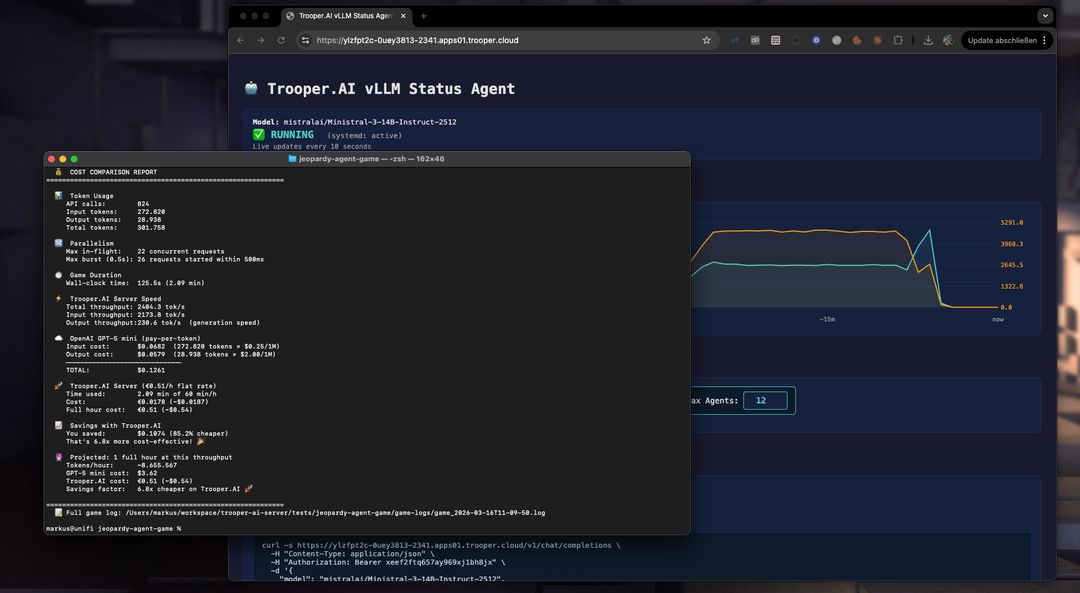
To give a rough idea of the economics of self-hosting, the following comparison projects the cost of running Ministral-3-14B-Instruct-2512 on a Trooper.AI GPU server versus using the GPT-5 mini API for the same workload.
The estimate is based on the real benchmark run described in this article and extrapolated to one hour of continuous inference throughput.
Hourly Cost at Measured Throughput
| Platform | Hourly cost |
|---|---|
| GPT-5 mini API | ~$3.12 |
| Ministral-3-14B on Trooper.AI GPU server | €0.51 (~$0.54) |
How this was calculated
This estimate is based on the actual benchmark run in this article using Ministral-3-14B-Instruct-2512 on a Trooper.AI GPU server.
| Metric | Value |
|---|---|
| Total tokens processed | 307,028 |
| Runtime | 153 seconds |
| Throughput | ~2006 tokens/sec |
| Projected tokens/hour | ~7.22M tokens |
Token mix in the benchmark:
| Token type | Tokens |
|---|---|
| Input tokens | 275,186 |
| Output tokens | 31,842 |
Scaling this ratio to ~7.22M tokens/hour and applying GPT-5 mini pricing:
- $0.25 / 1M input tokens
- $2.00 / 1M output tokens
results in an estimated ~$3.12 per hour for the same workload.
The Ministral-3 server on Trooper.AI instead runs at a flat €0.51/hour (~$0.54) regardless of token volume, which enables processing millions of tokens per hour at predictable cost.
Long-Running Workload Projection
Using the observed throughput we can estimate the cost of running the system for a full hour.
| Metric | Value |
|---|---|
| Tokens per hour | ~7,221,543 |
| GPT-5 mini cost | $3.12 |
| Trooper.AI server cost | €0.51 (~$0.54) |
Hourly savings
Running the same workload for an hour would still be:
≈ 5.8× cheaper on Trooper.AI
When Self-Hosting Becomes Much Cheaper
Self-hosting LLMs tends to win economically when:
- workloads contain many small requests
- parallel inference is required
- applications generate millions of tokens per hour
- workloads run continuously
Typical examples include:
- AI game simulations
- agent systems
- automation pipelines
- chat applications with many users
Summary
In this benchmark:
| Metric | Result |
|---|---|
| Model | Ministral-3-14B |
| Server cost | €0.51/hour |
| Tokens processed | 307k |
| Runtime | 153 seconds |
| Cost reduction | 82.8% |
| Cost advantage | 5.8× cheaper than GPT-5 mini |
For high-throughput workloads, running models like Ministral-3 on Trooper.AI GPU servers can dramatically reduce inference costs while also removing API rate limits.
Why you need the vLLM template
The Trooper.AI vLLM template gives you:
- OpenAI-compatible API
- Automatic GPU optimization
- Production-safe defaults
- Minimal configuration
- Maximum throughput
You only choose the model and API key.
Everything else is optimized automatically.
Troubleshooting
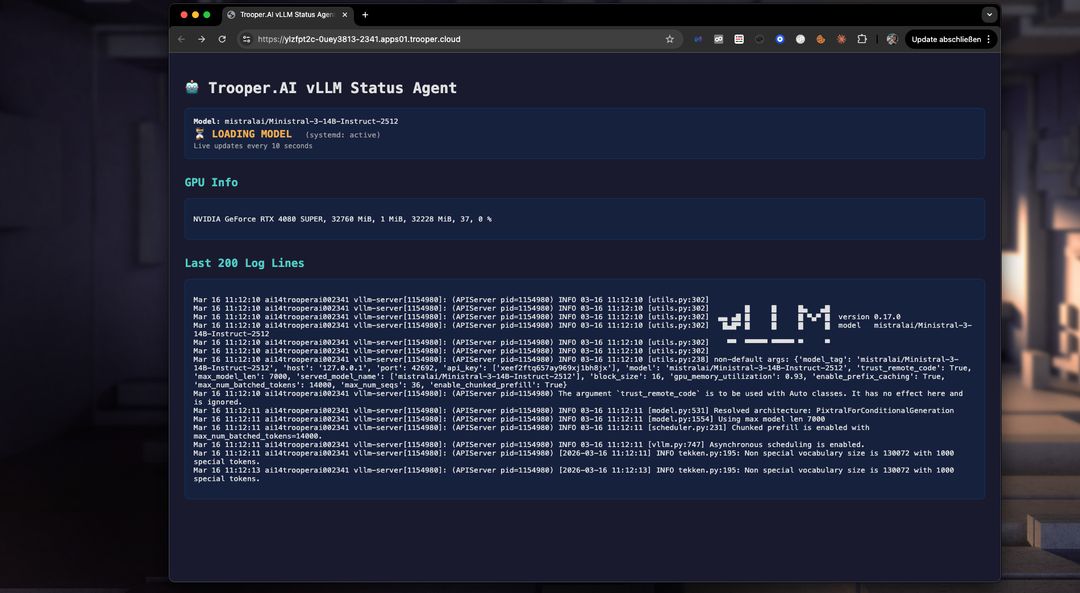
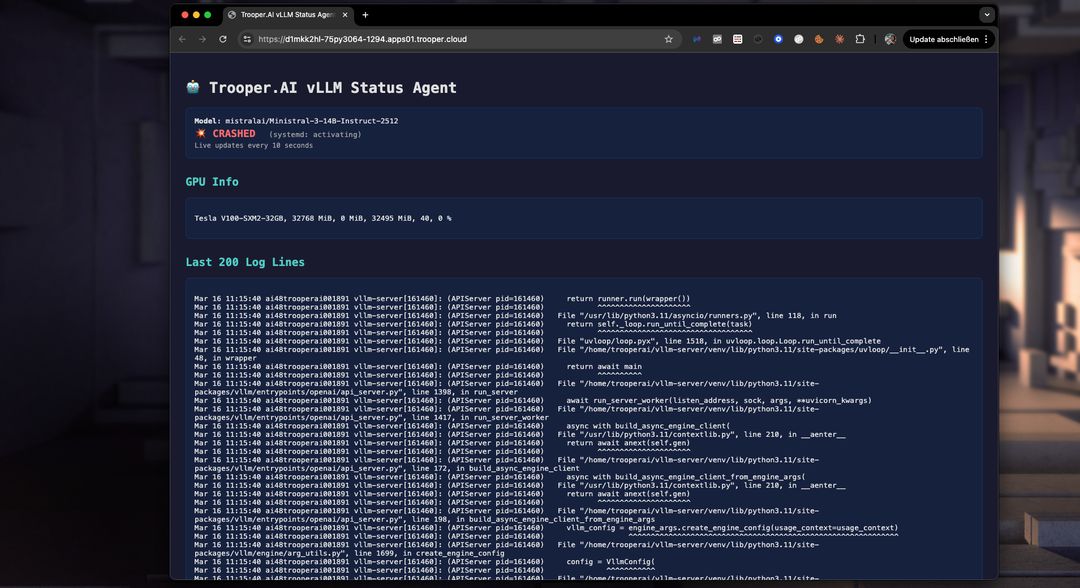
With the dashboard you can easily detect issues in startup and fix them. Not enougth VRAM? Upgrade to a higher Blib in minutes via the dashboard. Or fix the VRAM usage by lowering the token window size. Check the Logs easily in realtime with the dashboard:
Nemotron 3 Nano with Token Budget
For NVIDIA Nemotron 3 Nano you need at least vLLM version 0.18.1 (nightly as of 2025-03-30). You can configure the parser and token limit so you can use thinking_token_budget. Read more here: https://docs.vllm.ai/en/latest/features/reasoning_outputs/#online-serving
Be aware: this will lower the througput about -30%!
Modify command_line_args to something like this:
  --async-scheduling
  --reasoning-parser-plugin /home/trooperai/vllm-server/nano_v3_reasoning_parser.py
  --reasoning-parser nano_v3
  --reasoning-config '{"think_start_str": "<think>", "think_end_str": " - I have to give the solution based on the thinking directly now:</think>"}'
Download parser from:
wget -O - https://huggingface.co/nvidia/NVIDIA-Nemotron-3-Nano-30B-A3B-BF16/resolve/main/nano_v3_reasoning_parser.py
Alternatively you can use the nemotron_3_parser set to ON. This will do this for you. Make sure also activate nightly developer build!
This way you get more control over reasoning feature of Nemotron 3 Nano.
Support
For advanced tuning, multi-GPU, or custom presets, contact Trooper.AI support.